
Classes and Objects in Java
A class in Java is a blueprint that describes what data an object stores and what it can do. An object is a concrete instance of that class, created with the new operator and holding its own memory. You write the class once and can create as many objects from it as you need, each with its own set of field values.
1. What Is an Object and a Class in Java?
A class defines the structure and the behaviour shared by a group of objects. It holds variables (fields) and methods, which together are called class members. A class is the basis of encapsulation in Java: data and the code that works with that data live in one place.
An object (an instance of the class) receives everything the class describes. Each object keeps its own copy of the instance fields, so two objects of the same class can hold completely different values.
Methods describe what an object can do or what can be done to it. Fields (instance variables) describe its properties and characteristics.
Look at the image below. A Student class declares the fields name and id plus the methods setName() and setId() that assign them. Four objects are created from that single class: Anna, Leo, Sara and Max. Every student has a name and an id, but the values differ from object to object.
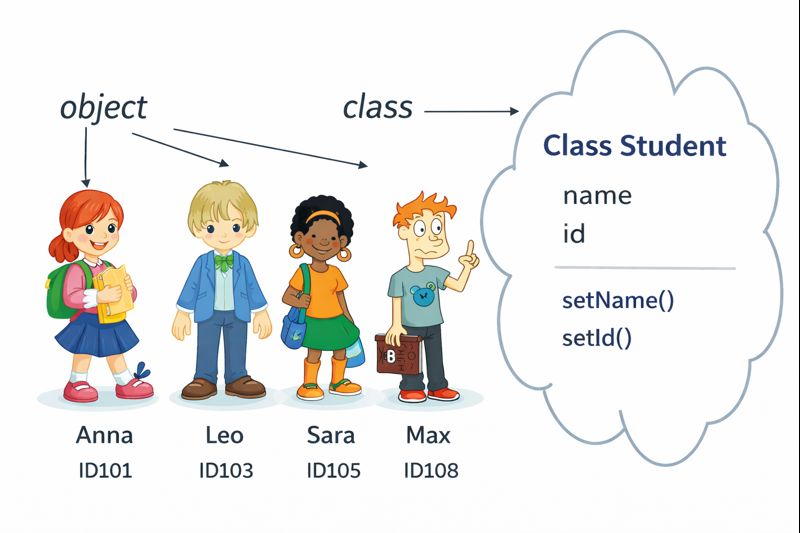
Class vs object: side-by-side comparison
| Aspect | Class | Object |
|---|---|---|
| What it is | A description, a template, a data type | A concrete instance built from that template |
| When it appears | When you write and compile the code | At run time, once new is executed |
| Memory | Loaded by the JVM once per class | Every object occupies its own block on the heap |
| How many | One class per description | Any number of instances of the same class |
| In code | class Box { double width; } | Box myBox = new Box(); |
An everyday analogy: the class is the architectural drawing of a house, the object is a house actually built from that drawing. One drawing can produce a hundred houses, and each of them can be painted a different colour.
2. How to Create a Class in Java
A simplified general class definition form looks like this:
class ClassName {
    type instanceVariable1;
    type instanceVariable2;
    // ...
    type instanceVariableN;

    type methodName1(parameters) {
        // method body
    }

    type methodName2(parameters) {
        // method body
    }
    // ...
    type methodNameN(parameters) {
        // method body
    }
}
The class keyword is followed by the class name. Fields and methods are declared inside the class body. There can be any number of them, and the order of declaration does not matter to the compiler.
Let's describe a Box. A box has three main characteristics - width, height and depth - so it gets three fields. Save this class in its own file called Box.java: the name of a public class must match the file name exactly, including the capital letter.
public class Box {
    double width;
    double height;
    double depth;
}
Worth knowing
In these teaching examples the fields width, height and depth are left open so that the code stays short. In production code fields are declared private and exposed through getters and setters - that is exactly what encapsulation means. See the lesson on OOP concepts for the bigger picture.
3. Creating Objects in Java: the new Operator
Declaring a class only produces a blueprint, never an actual object. To create a Box object you use the new operator:
Box myBox = new Box();When an instance of a class is created, the new object gets its own copy of every instance variable defined in that class.
Creating an object is really a two-step process:
- Declare a variable of the class type. The variable does not hold an object yet - it can only refer to one:
Box myBox; - Create the object with
new. Memory is allocated dynamically (that is, at run time) and a reference to the new object is returned:myBox = new Box();
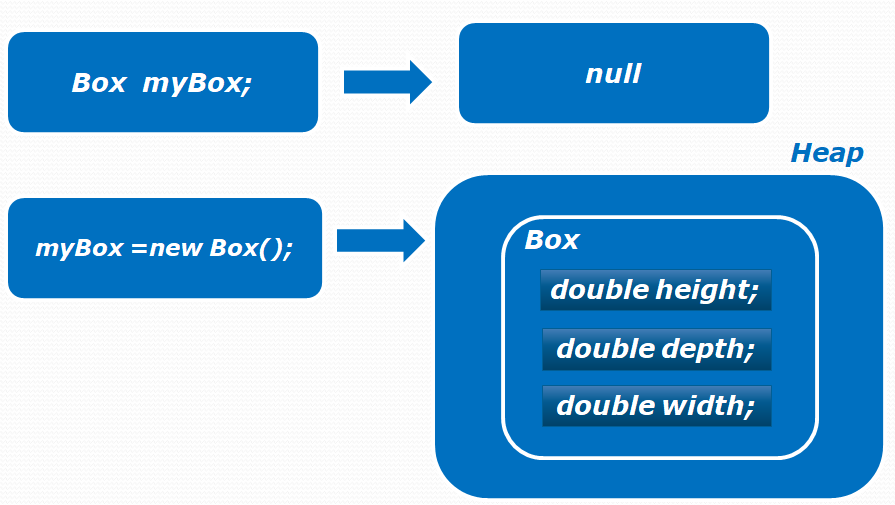
The object itself lives in the area of memory called the heap, while the variable myBox stores only a reference to it. How the JVM splits memory is covered in the lesson on stack and heap memory structure.
The parentheses in new Box() are a call to a constructor. If a class declares no constructor at all, the compiler adds a no-argument default constructor for you.
Right after the object is created, every field is set to the default value for its type: 0 for numeric types, false for boolean, null for reference types. To read or change a field, use the variable name, a dot, and the field name:
public class BoxExample1 {
    public static void main(String[] args) {
        Box myBox = new Box();
        // assign values to the fields of myBox
        myBox.width = 10;
        myBox.height = 20;
        myBox.depth = 15;
        // calculate the volume of the box
        double volume = myBox.width * myBox.height * myBox.depth;
        System.out.println("Volume is " + volume);
    }
}
Volume is 3000.0In the next example two Box objects are created and each one gets its own values. Changing the fields of one object has no effect on the other:
public class BoxExample7 {
    public static void main(String[] args) {
        Box myBox1 = new Box();
        Box myBox2 = new Box();
        double volume;
        // values for the first box
        myBox1.width = 10;
        myBox1.height = 20;
        myBox1.depth = 15;
        // different values for the second box
        myBox2.width = 3;
        myBox2.height = 6;
        myBox2.depth = 9;

        volume = myBox1.width * myBox1.height * myBox1.depth;
        System.out.println("Volume of myBox1 is " + volume);

        volume = myBox2.width * myBox2.height * myBox2.depth;
        System.out.println("Volume of myBox2 is " + volume);
    }
}
Volume of myBox1 is 3000.0
Volume of myBox2 is 162.0Note
Default values apply to instance fields and static fields only. Local variables inside a method are never initialised automatically: reading one before you assign a value is a compile-time error, "variable might not have been initialized".
4. Assigning Object References to Variables
It is perfectly possible for two variables to point at the same object in memory:
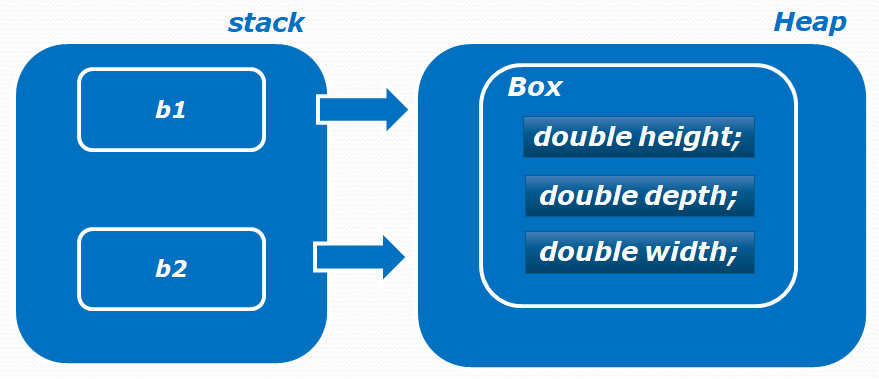
Here is how that happens. Declaring b1 creates a new object. Declaring b2 does not create a second object - b2 simply receives the reference stored in b1. Values 10, 20 and 15 are then assigned through b1, and the width is changed to 3 through b2:
public class BoxExample6 {
    public static void main(String[] args) {
        Box b1 = new Box();
        Box b2 = b1;

        b1.width = 10;
        b1.height = 20;
        b1.depth = 15;

        b2.width = 3;

        System.out.println("Width: " + b1.width);
        System.out.println("Width: " + b2.width);
    }
}
Both variables refer to one and the same object, so the program prints:
Width: 3.0
Width: 3.0
A change made through either variable is visible through both. The key point: b2 = b1 copies the reference, not the object. To get an independent copy you have to create a new object and copy the values across (or clone the object).
5. Adding Methods to a Class
Besides fields, a class can contain methods that hide implementation details and remove duplicated code. Let's add two methods to Box: getVolume() to calculate the volume and setDim() to set all three dimensions at once. Note that both methods are non-static (no static keyword), which is why they can read the fields of a particular object:
public class Box {
    double width;
    double height;
    double depth;

    /**
     * Calculate the volume of the box.
     *
     * @return the volume
     */
    double getVolume() {
        return width * height * depth;
    }

    /**
     * Set the dimensions of the box.
     *
     * @param w width
     * @param h height
     * @param d depth
     */
    void setDim(double w, double h, double d) {
        width = w;
        height = h;
        depth = d;
    }
}
The program below creates two Box objects. Instead of assigning every field by hand, it calls setDim() and passes width, height and depth - the code becomes noticeably shorter. A non-static method is always invoked on a specific object, so the volume is calculated separately for each box:
public class BoxExample2 {
    public static void main(String[] args) {
        Box myBox1 = new Box();
        Box myBox2 = new Box();

        myBox1.setDim(10, 20, 15);
        myBox2.setDim(1, 5, 5);

        System.out.println("Volume: " + myBox1.getVolume());
        System.out.println("Volume: " + myBox2.getVolume());
    }
}
Volume: 3000.0
Volume: 25.0The parameters of setDim() are named w, h and d so that they do not clash with the field names. If you name them width, height and depth instead, the parameter shadows the field and you need the this keyword: this.width = width;. You can also declare several versions of the same method with different parameter lists - see method overloading and overriding.
6. The Object Class: Every Class Inherits From It
The Box class was written from scratch and extends nothing explicitly. Its objects still have methods, though, because every class in Java implicitly inherits from java.lang.Object. The compiler reads class Box {} as class Box extends Object {}.
That is why the methods of the Object class are available on myBox straight away. The ones you will meet first:
toString()- the string representation of an object. By default it returns something likeBox@1b6d3586: the class name plus the hash code in hexadecimal.equals(Object obj)- object comparison. The default implementation compares references, so it behaves exactly like==.hashCode()- an integer hash code used byHashMapandHashSet.getClass()- returns aClassobject describing the runtime type.clone(), pluswait(),notify()andnotifyAll()for thread coordination.
Box myBox = new Box();
System.out.println(myBox);               // Box@1b6d3586 - toString() was called
System.out.println(myBox.getClass());    // class Box
System.out.println(myBox.equals(myBox)); // true
In real classes toString(), equals() and hashCode() are almost always overridden so that objects print readably and compare by value rather than by reference.
7. Where Beginners Get Tripped Up
- Touching a field before the object exists. The line
Box myBox;declares a reference only. WritingmyBox.width = 10;withoutnewgives a compile error about an uninitialised variable, or - if the reference was set tonull- aNullPointerExceptionat run time. - Comparing objects with
==. The==operator compares references, not contents. Two distinct objects holding identical values still producefalse. Useequals()for value comparison, and override it in your class if you need one. - Confusing a copied reference with a copied object.
Box b2 = b1;does not create a second box; both names point at the same one. - Calling a non-static method directly from
main.getVolume()belongs to an object, so it must be called asmyBox.getVolume(). Without an object you get "non-static method cannot be referenced from a static context". - File name does not match the public class name.
public class Boxhas to live inBox.java, otherwise the compiler refuses to build it. - Expecting fields to keep values between objects. Instance fields are per-object. If you need one value shared by every instance, declare the field
static.
Tip
Java has no delete operator. As soon as no reference to an object remains, the object becomes eligible for reclamation and the memory is freed by the garbage collector. Writing myBox = null; only drops the reference - it does not destroy the object on the spot.
Frequently Asked Questions
How many objects can be created from one class?
As many as available memory allows. Every new produces another object with its own copy of the instance fields. The only members shared by all instances are the ones declared static.
Can one .java file contain several classes?
Yes, but only one of them may be public, and its name must match the file name. The remaining classes are declared without an access modifier. The compiler still generates a separate .class file for each class.
What is the difference between an object and an instance in Java?
In practice they are the same thing. "Instance" stresses the relationship with the class it was created from, as in "an instance of Box", while "object" is the general term for the entity living on the heap. Interviewers use the words interchangeably.
What happens to an object when no variable refers to it?
It becomes unreachable and the memory it occupies will eventually be released by the garbage collector. The exact moment is not guaranteed: you cannot control it directly, and calling System.gc() is only a hint to the JVM.
Which methods does an object have if the class body is empty?
Every class implicitly extends java.lang.Object, so even objects of an empty class already have toString(), equals(), hashCode(), getClass(), clone(), plus wait(), notify() and notifyAll().
Practice
Reinforce this lesson with hands-on tasks, each with a level and a time estimate.
All module tasks →
Comments