
Java Compilation: -sourcepath and -classpath Explained
In this article, we will explore how to use the -sourcepath and -classpath options for compiling and running Java programs effectively.
1. Compilation with -sourcepath
The -sourcepath option specifies directories where the compiler should look for the source file hierarchy.
Consider an example with two classes in different packages: first.Example1 and second.Example2. The first.Example1 class creates an instance of second.Example2:
package first;

import second.Example2;

public class Example1 {
    public static void main(String[] args) {
        Example2 example2 = new Example2();
        System.out.println("Done!");
    }
}

package second;

public class Example2 {
}
Here is the directory structure:
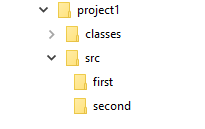
Now, let's try compiling Example1.java as we normally do:
cd project1
javac -d classes src/first/Example1.java
The compilation fails with the following errors:
src\first\Example1.java:3: error: package second does not exist
import second.Example2;
             ^
1 error
This happens because the compiler doesn't know where to find Example2.java. To fix this, use the -sourcepath option:
javac -d classes -sourcepath src src/first/Example1.java2. What is Classpath?
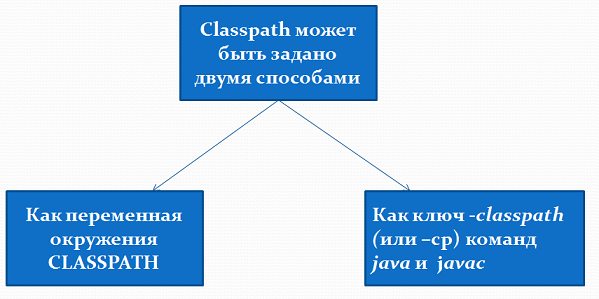
The classpath is used by the java and javac commands to locate other classes needed during compilation and runtime. It can be specified as:
- An environment variable (CLASSPATH).
- The -classpath or -cp option in the
javacandjavacommands, which overrides the environment variable for a specific call.
3. Using the -classpath Option
Suppose the second.Example2 class is in a different project and only its .class files are available. Here's the directory structure:
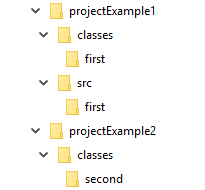
To compile first.Example1, use the following command:
cd projectExample1
javac -d classes -cp ../projectExample2/classes src/first/Example1.java
4. Key Points
- -sourcepath specifies directories for source files.
- -classpath (or -cp) specifies directories for compiled classes.
- Use relative or absolute paths for both options as needed.
- Including a subdirectory in the classpath doesn't automatically include the parent directory.
Path separator depends on the OS
When you list several directories in -sourcepath or -classpath, separate them with a semicolon (;) on Windows and a colon (:) on Linux and macOS. For example, on Windows: -cp dir1;dir2; on Linux/macOS: -cp dir1:dir2.
Frequently Asked Questions
What is the difference between -sourcepath and -classpath?
-sourcepath tells the compiler where to find source (.java) files it may need to compile, while -classpath (or -cp) tells both javac and java where to find already compiled (.class) files and libraries.
What is the difference between the -cp option and the CLASSPATH environment variable?
Both define the classpath, but the -cp option overrides the CLASSPATH environment variable for that single command only — it does not change CLASSPATH for other invocations. If no -cp option is given, Java falls back to the CLASSPATH variable.
How do I specify several directories in the classpath?
List them in one value separated by the platform path separator: a semicolon (;) on Windows and a colon (:) on Linux and macOS, for example -cp classes;lib/app.jar on Windows or -cp classes:lib/app.jar on Linux/macOS.
Does Java search the current directory when I use -cp?
Not automatically. Without any classpath setting, java and javac search the current directory by default. But once you pass -cp, only the directories you list are searched — add . explicitly (for example -cp .;lib) if you still need the current directory.
If I put a subdirectory in the classpath, is the parent directory included too?
No. The classpath includes only the exact directories you list. Adding a subdirectory such as ../project2/classes does not include its parent ../project2 — each directory must be listed explicitly.
Practice
Reinforce this lesson with hands-on tasks, each with a level and a time estimate.
All module tasks →
Comments